Showing posts with label How to mess with reality - and why. Show all posts

How to Cope with a Really Bad Photo Reference


Bad reference photos happen and this is about how you can begin to make the best of it...

In a perfect world, I would only work with a great photo reference like the one below of Sara Lawrence Lightfoot. I took it in my studio with only a single source of light (like the light the Old Masters used).

Without any tweaking, this particular photo reference tells me pretty much what I need to know in order to paint Sara.

Obviously a good photo helps to make a good painting....the better the photo, the better the painting can be.


Then there are the problem reference photos we must work with because nothing else is available.

With the miracle of Photoshop, you may not need to resort to my "Studio Stress Reduction Kit."

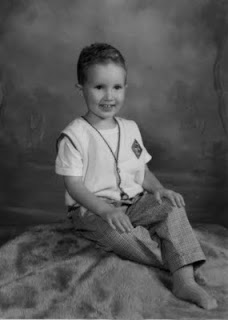
The little boy in the picture below is four and his mother wants to paint him at this particular age.

And alas, he has now grown up or my first suggestion would be for her to take another photo using a single source of light.

He's obviously a cute little guy but a reference like this is generally a nightmare. Here are some ways to allow yourself to "see" what you need to "see" in order to paint a decent portrait based on a poor photo reference.

(Note that I am not bothering to crop this into any other composition.)


This is the original full color photo.


This is the same photo desaturated (i.e., changed into Greyscale) in Photoshop. Color can confuse the eye and seeing value is most important here.

This is what I call the "Ansel Adams" approach to seeing a photo (above). This technique can sometimes salvage a poor photo or even make a mediocre photo look sensational:

Make a Layer in Photoshop. I used a Gaussian Blur Filter (12 pixels on this one) and adjusted the Brightness/Contrast to +15/+15.

Then fade this layer to about 35% and flatten the image. The result can sometimes give you a soft and glowing effect with softer transitions from light to shadow - much like an Ansel Adams photograph (tough to see here - sorry).


Here's another way to look:

I posterized a copy of the original grayscale photo to 5 levels above. I'm looking for pleasing patterns of light and shadow here - and a good solid abstract composition.


Posterized at 13 levels, you can see a more precise map of the distribution of value from highlight to deep shadow.


In this detail of the face, you can see where the centers of light are to be found and observe how light flows over the form.


A posterized detail of the arm shows how light plays on the form.


This is a close up detail of the unaltered face.

Sometimes we must paint what we know - and not merely what we see.

So I took some liberties to mess with reality below:


Photographs tend to clump values on both ends of the scale.

Therefore I reduced the contrast between the teeth and the inside of the mouth so it will end up looking more "normal" in the painting.

(Unless the subject is a small baby, I don't know any professional portrait artist who will paint an open mouth).
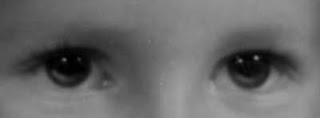

This is an eye detail of the face above showing how I added light to the iris and moved the highlights up. In a painting, this will make the eyes look more "real."

The source light comes from the upper right and the light (not highlight) reflected in the eyes is an opportunity to get the "color" right.

Note that under the clear lens of the eye, the iris is shaped like a shallow "concave dish" whose opposite rim catches light.

Also, I raised the existing highlights in the eye. This is a portrait painter's trick to make the child look "more intelligent" in the final painting.

Note that I always add highlights in the eyes after the surface is dry. It's easy to make someone look googly-eyed and it usually takes me a couple of tries before I get it right.

I like the option of wiping off the paint without wrecking the entire freshly-painted eye.


"Shrink the head" and read about why I do this. Because this is a child and his head is proportionally large, I don't shrink it very (much as shown above).


Painting plaid and other complicated patterns isn't as hard as you think. I added the Photoshop Gaussian Blur filter to make the light underneath the pattern easier to see.

First you will need to paint the cloth beneath the pattern and get the light and shadow right. Then paint the pattern.

I do hope this helps....


Encaustic Portrait: J Mitchell Bailey


I just finished this little encaustic, oil and graphite portrait.


(Jesse) Mitchell Bailey, 1918-1945
10" x 10" Encaustic, Oil and Graphite on Board


Detail of Mitchell's face.

This was a very difficult portrait to paint because:

#1 My reference material was poor

#2 The finished head is extremely small (1.75 inches high)

#3 I used encaustic paints and since I'm a beginner in this medium, my skill level is not up to snuff - yet.

Now, in the "DO AS I SAY BUT NOT AS I DO" Department....

I agreed to this job for no good reason.

It came with awful photo references (as you can see from the faded 70+ year old snapshots below). But merely because I had a beloved aunt named Jessie Mitchell I grabbed the job...go figure.


I was totally prepared to not have the client like it - but I wanted to paint it anyhow.

Mitchell died tragically at the age of 27. He had a strong, angular and exceptionally handsome face. He had been an oarsman at Yale and stayed in shape.

In my research I found an old magazine cover with a 1908 Leyendecker illustration of a Harvard Oarsman and leaned heavily on that as a basic body model. (So noted on the back of the painting.)

Per usual, I made his head too small so he would appear more "commanding and in charge." Read more about why I mess with reality both here and here.


Here is the entire painting without the frame (pictured above). You can see that I followed the Red, Yellow, Blue, Black and White Rule.

The overall "softness" of this portrait is characteristic of the way I am currently using my encaustic paint.

Some Nerdy Technical Details:

For starters, I've cranked up the heat on my encaustics and am working at 250-275 degrees F these days. Maybe hotter if I dare...

I did a little graphite drawing of that face (backwards) on tracing paper (I made-up shadows & added an ear) and transferred that, thus destroying the paper and embedding just the graphite into the first layers of encaustic.

Then I used a brush with powdered graphite to finish that face drawing in wax before I sealed it with clear medium. The face was too small to paint with a brush accurately but using a soft graphite pencil made it easy.


Above is an extreme blown up detail and hopefully you can see that the grey of the graphite represents the cool halftone. Of course, any student of mine knows that halftones are always cool, eh?


What I love about encaustic paint is that it is such an "immediate" medium. For example, if you hesitate a wee bit too long, the melted pigmented wax on the brush will harden and that brush will will stick to the surface and make an awful mess. Naturally I speak from painful personal experience. :o)

The rest of the painting is my usual layered mix of encaustic and oils.

I am only beginning to explore what this unique encaustic medium offers.


"Engrave It!" of Keene, NH supplied (they ship) the 1/2" high brass nameplate for the frame because I simply couldn't handle lettering that small in this medium.

Messing with "Reality"


Mother and Child
30" x 36" Oil on Linen

Besides the head size factor in the post below, here's another example of messing around with "reality". I had to use an example from my own work this time. (Sorry, I do not have a better photo of this painting).

The mother is a very petite woman. And her baby - based on my photographic reference - appeared to be much too large (in proportion to her) - a fact that only became apparent to me as I began to work out my drawing prior to painting.

I had to really "shrunk" the baby in this painting in order to make him "look real." Had I painted his size accurately (as in the photo) in relation to his mother's size, he would have looked very large and unreal.

I always try to paint to an archetype, i.e., "babies and children are
small."

In a painting, "When it looks right - it is right."

When people claim that an artist should never use a photograph to paint from - I think that they may have little understanding of what must be done in order to translate a photographic reference into a painting.

Photos are good as photos - but an artist really cannot be expected to copy a photo exactly in order to make a good painting. It takes knowledge and skill (and a little trickery) to translate a visual image into something that looks "real."

Head Size and the Suggestion of Intellect in Painting


Although I paint from photographic reference material, I don't feel any need to be confined by that "reality" - most especially when it comes to an anatomical proportion like head size. 

This is one of those little portrait painter secrets that hides in plain sight in just about every "old" portrait you will find hanging in any museum.

Below are some more extreme examples so you can easily see and understand this. Velazquez made King Philip IV of Spain look very "kingly,  noble and intelligent" by merely adjusting the proportions of his body to be larger and "shrinking the size" of his head. 


The painter also chose a perspective point slightly above our eye level so that in order to view the King's face, we must "look up" to him. This painting is very large ( 82 1/8" x 43 3/8" - and with the heavy frame, it looks larger still)-  yet the head is less than life size! 

The king's only decoration is a golden chain. Most royal portraits of this era emphasized lavish displays of clothing and props but Philip IV is soberly represented in black. Because of the artist's skill in employing this "head size" trick, the importance of this great and powerful ruler is self-evident.

We can easily translate "understating the head size" into contemporary portraiture.  I employ this technique when I want the personality to appear as an intelligent and worthy leader. (i.e., when painting a president, CEO, etc). 

However, I would suggest that this "painting trick" be very subtle and not appear as extreme as these examples (although Velazquez's example of this above illustrates the concept so well).

When the subject is painted with a large head (as in the pictures below), even though it looks perfectly normal in reality, this "large-head" feature tends to make the sitter look a "wee bit stupid" in a painted portrait.

John Singleton Copley probably painted the actual sitter's head size accurately, but it doesn't really flatter or make The Portrait of Eleazer Tyng (below) look very bright. 

It was tough to find any Old Master Painter who painted heads too large so I offer my apologies to John Singleton Copley for picking on him for these examples. 


Below is another example of a head (The Portrait of Hon John Erving) that is painted at an unflattering size. 


And yet another "big head,"- herewith The Portrait of Exekiel Goldthwait. If anything, the clothing, wig and background devices may suggest his "importance."


I define "head size" to be the measurements from under the chin to the top of the skull (not the top of the hair).

Most adult head sizes average 9 inches...give or take....

 I prefer to not paint any head larger than 6 1/5 inches (3/4 size) no matter how large the canvas size.

The larger the canvas, the more important the clothing, props and "background" become.

Below is a large painting - still with less than life size heads but lots of background.


Above is another copley "Mr. and Mrs Ralph Isard," and this canvas size is 68 3/4" x 88." The viewer is so "taken with" all the interesting things happening in this painting and Copley's painterly brush that we hardly notice those shrunken heads on life (or larger-than-life) size bodies.

* Note, there is a little matter of catchlights in the eyes - where you put them will give a sitter a decidedly "dull" look or make them appear bright-eyed and bushy-tailed.

But that is for a later post, stay tuned.